Expert Slide and Photo Scanning Since 2002.
4,000 ppi Scanning and Premium Photoshop
Editing On Every Scan. Still 39¢ most slides.
We also can make PRINTS from your Slides.
Affordable Scanning Services
www.Slides.Pics
www.Slides.Pics
 Home
Home Order Forms
Our Lowest 35mm Slide Scanning Resolution is 4,000 PPI
Our normal scanning resolution for your 35mm slides and films is 4,000 pixels per inch. Could you settle for less? Maybe. Should you settle for less? Its up to you. Our standard service scanning at 4,000 ppi includes expert Photoshop editing by one of our highly trained Photoshop Artists, also includes our free DVD slide show disk which will show at HD quality on your HD TV. If you don't have one now, you will have one eventually. Get the scanning resolution that is going to be the best for your slides far into the future.
Question: What would be an advantage of scanning at 4,000 ppi instead of a lower resolution?
Answer: You will be getting more detail in your image. If you want to blow it up in the future, you will be able to blow it up to a much bigger size.
| Here are some examples of PPI differences but they just go to 3200 ppi: |
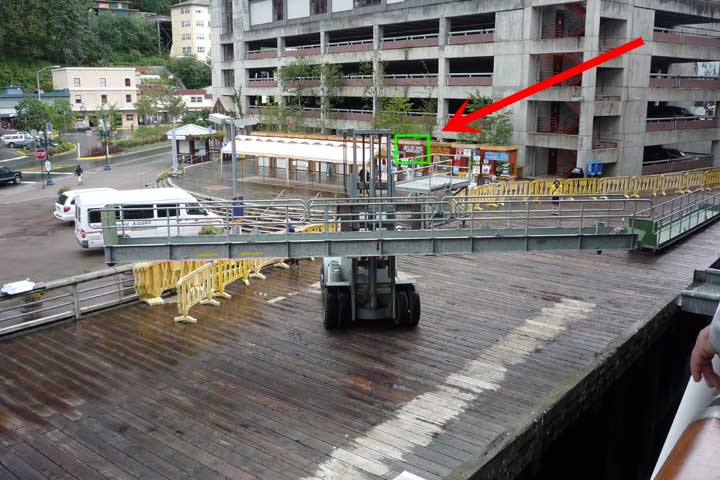
| See the arrow pointing to the green box in the full image, below. The examples to follow will be of the part of the image in the green box. This will show you the difference you can expect at different resolutions. |
 |
 This is a detail of the scan at 3200 ppi. |
 This is a detail of the scan at 2600 ppi. |
 This is a detail of the scan at 2000 ppi. |
 This is a detail of the scan at 1000 ppi. |
| Below, you can see what you get if you blow up the the lower res scans to the same dimensions as our normal 3,200 ppi scan. |
| 3200 ppi |
| 2600 ppi |
| 2000 ppi |
| 1000 ppi |
 This is a detail of the scan at 3000 ppi. |
 This is a detail of the scan at 2400 ppi. |
 This is a detail of the scan at 1500 ppi. |
This is a detail of the scan at 1000 ppi. |
| Below, you can see what you get if you blow up the the lower res scans to the same dimensions as our normal 3,200 ppi scan. |
| 3000 ppi |
| 2400 ppi |
| 1500 ppi |
| We think you can see that, the higher the resolution of the scan, the more detail you can see and the bigger you can print. The higher resolution scan has more details and you can see the pixelization of the lower resolution scans. It all depends on the quality that you want for your scans. Each step up represents higher quality of the scan. |
KODAK Optimum Print Quality for Professional-quality Prints |
||
|
|
Minimum recommended |
| 4 x 6" | 250 | 1000 x 1500 |
| 5 x 7" | 250 | 1250 x 1750 |
| 8 x 10" | 250 | 2000 x 2500 |
| 11 x 14" | 250 | 2750 x 3500 |
| 16 x 20" | 150 | 2400 x 3000 |
| A35ss.com's Standard 4,000ppi Scanning |
5256 X 3544 | |
Pixels and megapixels:
Just a note: Some people say DPI, which is taken from the printing term of "Dots Per Inch" which are actual dots on a printing plate. Since we are talking about digital images here, which have pixels and not "dots", we use the correct terminology of "Pixels Per Inch." Just a small technicality. We know what you mean if you say DPI, so don't worry about it.
Pixels are the basic building blocks of every digital image; the more pixels in your photos, the better the Print appearance.
A megapixel means one million pixels and is the unit of image-sensing capacity in a digital camera, or the amount of information the camera can capture. Generally, the more megapixels a camera has, the better the print resolution will be.
We scan at 4,000 pixels per inch and our 35mm slide scanned images have a total of 5,256.00 X 3,544.00 = 18,627,264 pixels.
|
About Our Company Copyright 2023 |

|
|


|
Email: Click Here After hours you will get a quicker response by using email. We answer email at ALL hours. Telephone messages are replied to during business hours. Affordable Scanning Services LLC 400 Bittersweet Lane Waupun, WI 53963
|