Expert Slide and Photo Scanning Since 2002.
4,000 ppi Scanning and Premium Photoshop
Editing On Every Scan. Still 39¢ most slides.
We also can make PRINTS from your Slides.
Affordable Scanning Services
www.Slides.Pics
www.Slides.Pics
 Home
Home Order Forms
3D Stereo Slide
Scanning Service

Stereo 3d Slide Scanning Order Form
We cannot automate the 3D Stereo Slide scanning process. See the order form for our prices. The price includes precision cropping as well as enhancing the color of faded slides when possible. No extra charge. Each image is individually viewed, color assessed and adjusted by a Photoshop expert, as much as possible, for pleasing color.
We think this our price is fair considering the time that is involved and especially since we also enhance each scanned image at no extra charge. One side of the 3D Stereo slide is scanned and digitized. In this case we are mainly interested in the transfer of the slide to digital. We are not converting the stereo slide to digital stereo or to a 3D image.
Please NOTE: We are sorry but, we will NOT scan both sides of the slide. This is not in our workflow and we cannot change our workflow. Please don't ask. The answer is no. Sorry.
We scan these slides at 4,000 ppi You are going to end up with an image that is approximately 5,256.00 X 3,544.00 = 18,627,264 pixels. That is almost 18 mega pixel quality. Your size all depends on the area of your 3D stereo slide.
3D Slide Scanning Slide Preparation
Your slides should be arranged in stacks that will be displayed as separate
chapters in your slide show. (Don't forget that you probably will want text frames to identify your stacks when they are converted to digital "chapters." Click here for info on Text Frames.)
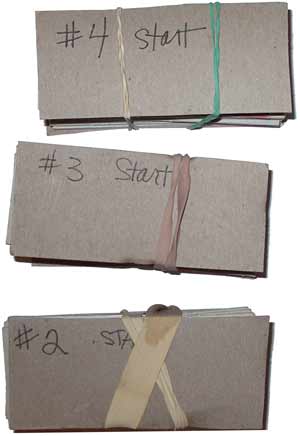 Please be sure to NOT put rubber bands tightly around your stacks because you can easily bend or warp the slides and make them difficult for us to get a good scan. You might want to put the slides in a tightly wrapped envelope rather than use rubber bands. If you do use rubber bands, use a heavy piece of cardboard on both sides of your stack so that the bands do not damage the slides.
Also, do NOT stick anything on the slide that would cause it to have the size altered in any way. If you have one side of the slide that is bad, put a piece of masking tape over the bad side but make sure that the tape only covers the film and doesn't hang over the side of the slide.
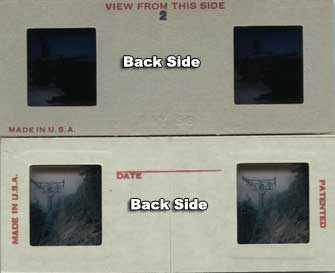
Arrange your slides so that, if you put them into a viewer, the side that would be towards you is facing DOWN in the stack. Another way to look at this would be that the slides that have the company logo should be facing UP. The first slide in the stack should be the top slide. The second slide should be #2, and etc.
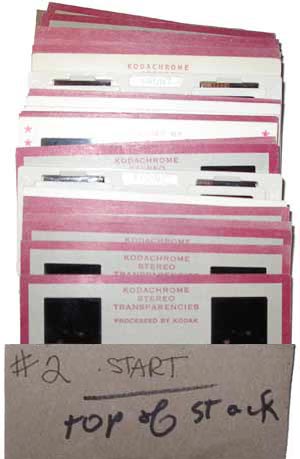
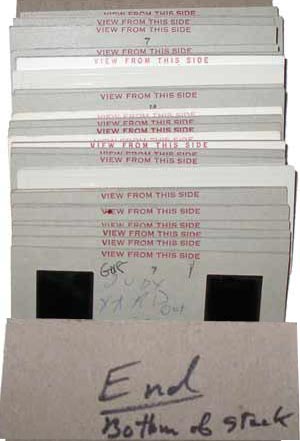
The slides below show the stack of slides from the bottom of the stack.
For whatever reason, you may favor one side of the stereo slide instead of the other. Maybe it is just a better shot and you get more people into it. What we need you to do to show us that you favor one side and not the other, is to use a Post-It to cover the side you do not want scanned. We need you to put the Post-It on the FRONT of the slide, not the back. See examples below:
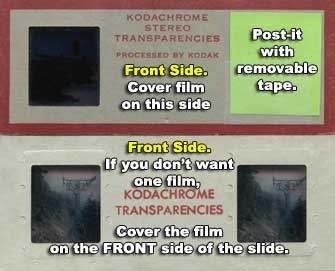
We can't show you what every 3d slide looks like for front and back but the front of the slide is generally going to have the manufacturer logo or some kind of ID on it. The back side is going to be generally blank compared to the front.
You can also tell if you are looking at the front of the slide, if you hold it up to a light and you see a sign, the sign should read backwards. Don't worry, this is for scanning purposes only.
Do It Yourself 3d Stereo Slides
Stereo slide aficionados could make their own stereo slides. All they would need was a stereo slide camera. Get the stereo film processed and then use these special do-it-yourself stereo slide holders. The films could be slid into the slots, one on the left and one on the right, easily accessible without tearing the holder apart. Stereo pictures could also be taken without a stero camera by taking one shot and then, holding your position but moving the camera to the left or right about two inches and then taking another shot. This would simulate what would be seen out of the right and left eyes. Our eyes see in "stereo." The pictures are taken from different perspectives. Put the processed films into these special holders with open slots and then put the 3d slide holder into a viewer and you have a 3d Stereo view that has depth.
|
About Our Company Copyright 2023 |

|
|

|
Email: Click Here |